 Shipped by Prompt
A .netlify.app address is fine for testing. For anything you put on a business card, an app store listing or a launch post, you want your own name. On Netlify the domain itself is the only part you pay for: connecting it and the HTTPS certificate are included on the free plan. For comparison, Lovable and Bolt both require a paid plan for custom domains ($25 a month for Pro on each, checked 31 October 2026).
This guide assumes the app already runs on Netlify. If not, start with From Lovable, Bolt or v0 to a live Netlify URL.
1. Buy the domain
Any registrar works. A few things to check before paying:
- The renewal price, not the first-year price. Many registrars discount the first year heavily. The renewal price is what you pay every year after.
- WHOIS privacy included. Most registrars now include it for free; avoid paying extra for it.
- The account is yours. If someone else buys the domain for you, make sure it is registered to your account and email. Getting a domain back from a former freelancer is a common and painful job.
Pick the shortest name people can spell after hearing it once.
2. Choose who runs the DNS
DNS is the address book that tells browsers where your domain lives. You have two options:
| Option | How it works | Good when |
|---|---|---|
| Netlify DNS | You change the domain's nameservers at the registrar to Netlify's. Netlify then manages the records for you. | The domain is used only for this app and you want the least setup. |
| External DNS | You keep the registrar's DNS and add records that point at Netlify. | The domain already has email or other services set up, which you do not want to disturb. |
If your domain already sends and receives email (for example through Google Workspace), external DNS is the safer choice for a first setup. Moving nameservers moves every record, and missing an email record means missing email.
In your Netlify project, add the domain under the domain management settings. Netlify then shows the records it expects for the option you choose.
3. Add the records (external DNS)
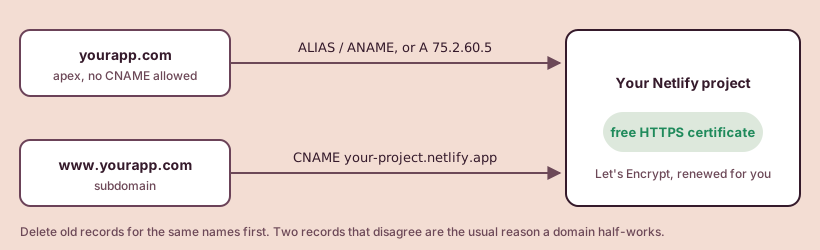
Most people want both yourapp.com and www.yourapp.com to work. They need different records:
www.yourapp.com (a subdomain). Create a CNAME record named www that points at your Netlify address, such as your-project.netlify.app.
yourapp.com (the apex or bare domain). Apex domains cannot use CNAME records. Use one of these instead, in order of preference:
- An ALIAS, ANAME or flattened CNAME record pointing at your Netlify address, if the registrar offers one.
- Otherwise, an A record pointing at Netlify's load balancer IP address,
75.2.60.5.
Delete any old A or CNAME records for the same names that point somewhere else, such as a parking page or the builder's hosting. Two conflicting records are the most common reason a domain half-works.
4. Wait for HTTPS
Once the records point at Netlify, it requests a free certificate from Let's Encrypt and renews it automatically. You do not need to buy an SSL certificate.
How long it takes depends on how fast your DNS changes spread. If the first attempt fails because the records have not spread yet, Netlify retries every 10 minutes for the first 24 hours. In practice: change the records, wait, and check back rather than changing them again. Editing the records repeatedly restarts the wait.
When HTTPS will not come up
Netlify's troubleshooting docs list the usual causes:
- DNS does not point at Netlify yet. Check the records again for typos, and for an old record still pointing elsewhere.
- A CAA record blocks Let's Encrypt. A CAA record lists which certificate authorities may issue certificates for your domain. If your domain has one and it does not include Let's Encrypt, the certificate request fails every time. Either add Let's Encrypt to it or remove the CAA record.
- It has been more than 24 hours. After the retry window, follow the troubleshooting page linked below to renew the certificate request by hand.
After it works
- Open both
https://yourapp.comandhttps://www.yourapp.com. Netlify picks one as the main address and redirects the other to it. - Update anywhere that still uses the
.netlify.appaddress: the login redirect list in Supabase, links in emails, and any API settings that check where requests come from. - If the app used to live on a builder's custom domain, remove the domain from the builder project so it stops trying to serve it. Move an app off builder hosting covers the full switch without downtime.
With the domain in place, the app is ready for real visitors. Two last checks before you announce it: are your API keys out of the browser (guide), and will the launch traffic fit your Netlify plan (guide)?
Sources, checked by hand
- Netlify: Configure external DNS2026-10-31
- Netlify: HTTPS (SSL)2026-10-31
- Netlify: Troubleshoot SSL and HTTPS2026-10-31
- Lovable: Custom domains2026-10-31
- Bolt: Domains2026-10-31