 Shipped by Prompt
Your app is live on a lovable.app or bolt.host address, maybe with your own domain on top, and people use it. Moving it to Netlify is not hard, but doing it in the wrong order can take the app offline for a few hours. This guide is the order that avoids that.
Should you move at all?
Moving makes sense when one of these is true:
- You pay for a builder plan mostly to keep the domain. Lovable and Bolt both put custom domains on paid plans (Pro, $25 a month on each, checked 31 October 2026), and Bolt disables custom domains if you downgrade. On Netlify a custom domain and HTTPS are part of the free plan.
- You want to check changes before visitors see them. On the builder, publishing is all or nothing. On Netlify, a change made on a branch gets its own preview address, and only the main branch goes live.
- Someone other than you edits the code. A freelancer or a developer friend will want a repository and a normal deploy process, not your builder login.
Stay where you are when:
- You are still building every day and nobody depends on the app yet.
- You never want to touch GitHub.
- The app relies on something only the builder's hosting provides. Check this before moving: if the builder runs part of your backend for you, that part has to keep running somewhere.
What moves and what stays
| Part | Moves to Netlify? | Notes |
|---|---|---|
| Frontend (screens, styles, client code) | Yes | Built from your GitHub repository |
| Supabase database, users and logins | No | Stays in your Supabase project; the new frontend uses the same project |
| Supabase edge functions | No | They run on Supabase, not on the frontend host |
| Domain | You re-point it | The registration stays with your registrar |
| The builder project | Keep it | You can keep editing with prompts; changes sync to GitHub and Netlify deploys them |
The important row is the database. Moving the frontend does not copy or touch any data. Users keep their accounts, because those live in Supabase.
One setting in Supabase does depend on the address: the list of allowed redirect URLs for login. If your app has login by email link or Google, add the new Netlify address (and later your domain) to that list before you switch, or logins will bounce back to the old address.
The order that avoids downtime
1. Deploy a copy on Netlify first
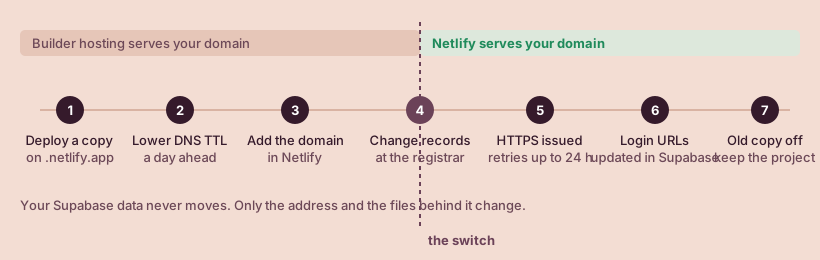
Follow From Lovable, Bolt or v0 to a live Netlify URL to get the app running on a .netlify.app address. Your existing app on the builder keeps running untouched while you do this.
Check the copy properly: log in, create something, refresh an inner page, open it on a phone. Everything you test here is against your real Supabase data, so use a test account.
2. Lower the DNS waiting time (optional, a day ahead)
If your registrar lets you edit the TTL of your DNS records, set it low (for example 5 minutes) a day before the switch. When you change the records later, visitors pick up the new address sooner. If you cannot find the setting, skip this step; the switch still works, it just takes longer to reach everyone.
3. Add the domain on Netlify
In your Netlify project, add your custom domain. Netlify then tells you which records it expects.
4. Remove the domain from the builder, then change the records
Remove the custom domain from the Lovable or Bolt project so the builder stops claiming it. Then, at your registrar:
- For
www.yourapp.com, point a CNAME record at your Netlify address. - For the bare domain
yourapp.com, use an ALIAS, ANAME or flattened CNAME record if your registrar offers one. If it only offers A records, Netlify's docs give its load balancer IP:75.2.60.5.
Apex domains cannot use a CNAME record, which is why the bare domain is handled differently. The domain guide covers both setups in detail, including using Netlify DNS instead.
5. Wait for HTTPS
Netlify requests a free Let's Encrypt certificate once the records point at it. If the first attempt fails, Netlify retries every 10 minutes for the first 24 hours. During that window some visitors may see a certificate warning, which is why the low TTL in step 2 helps. A common reason it never succeeds is a CAA record on the domain that does not allow Let's Encrypt.
6. Update the login redirect URLs
Add https://yourapp.com to the Supabase redirect list, then test login on the real domain.
7. Turn off the old copy
Once the domain serves the Netlify version and logins work, you can unpublish the builder-hosted copy. Keep the builder project itself if you still edit with prompts.
After the move
Two habits keep the new setup cheap and calm:
- Work on a branch. Ask the builder to work on a branch, or open a pull request for bigger changes. Netlify builds a preview for it, which you can share, and only merging to main uses a production deploy.
- Watch the credits. Netlify's free plan has 300 credits a month and each production deploy uses 15. Is Netlify's free plan enough? has the numbers.
If something breaks during the move, Fixes for Netlify deploy errors lists the problems people report most often and their fixes.
Sources, checked by hand
- Lovable: Hosting2026-10-31
- Lovable: Custom domains2026-10-31
- Lovable: Supabase integration2026-10-31
- Bolt: Hosting plans2026-10-31
- Bolt: Domains2026-10-31
- Netlify: Configure external DNS2026-10-31
- Netlify: Troubleshoot SSL and HTTPS2026-10-31
- Netlify: Deploy Previews2026-10-31